Promotions
COMPASS manages the full promotion workflow from eligibility checking through approval and SFI database update. This page covers the complete process for both standard promotions (O-1 through O-5) and flag officer promotions (O-6 and above).
Go to Promotions in the left navigation to open the Promotion Eligibility Report.
Can't approve promotions yourself?
Approving promotions is a CO ability, but a CO can delegate it to their XO — see Delegating Command Authority.
The Promotion Eligibility Report
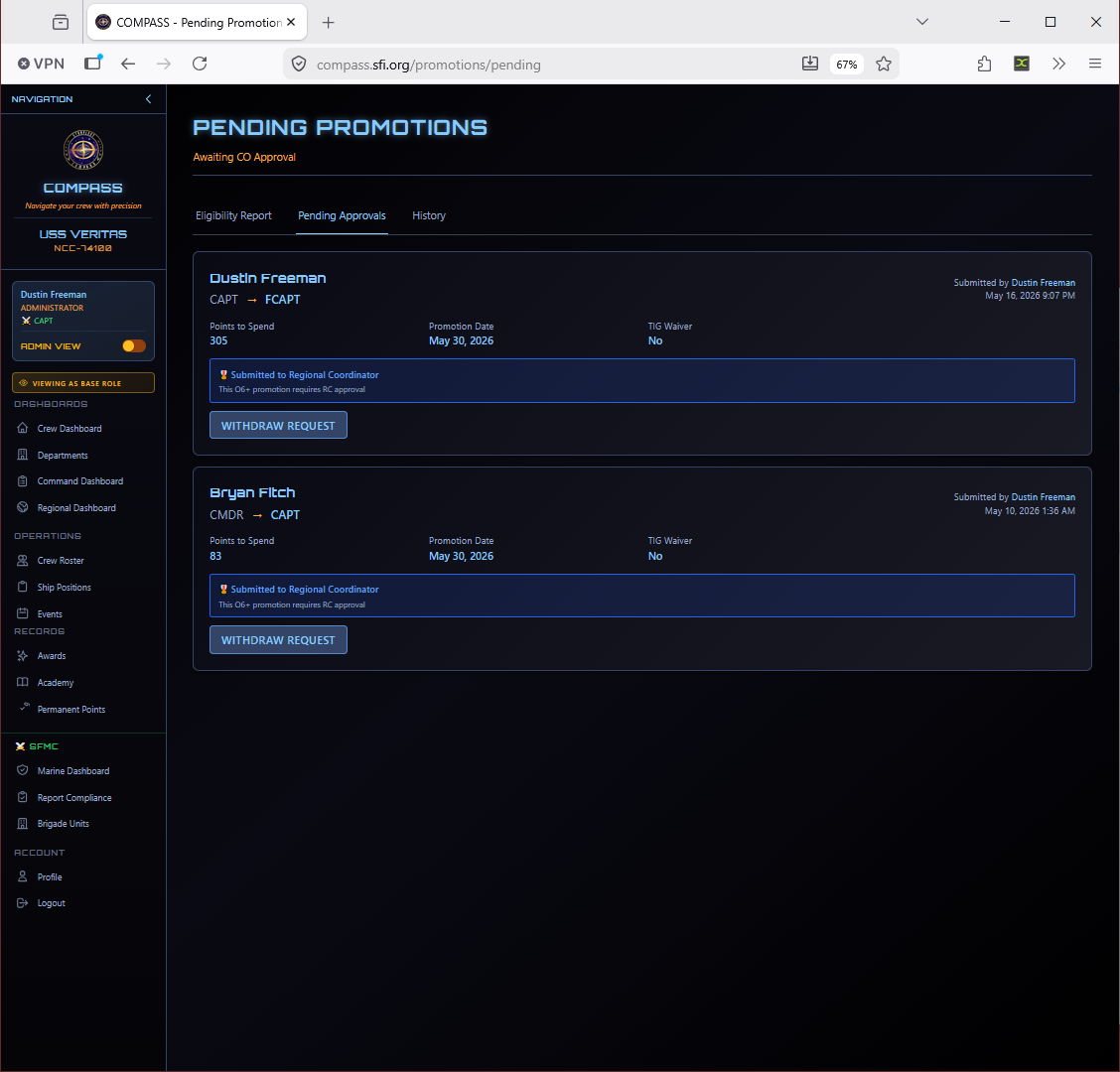
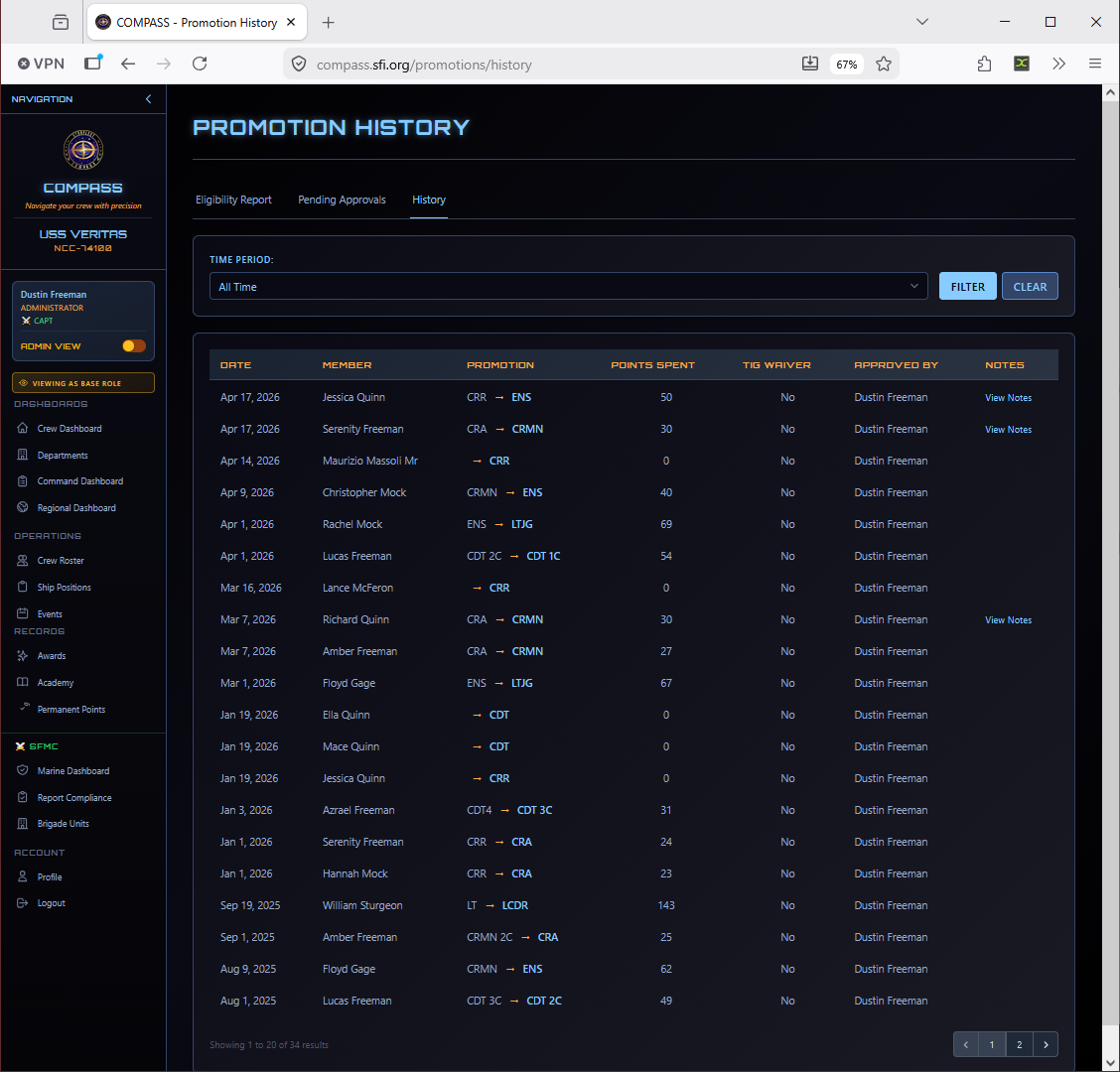
The report has three tabs:
| Tab | What It Shows |
|---|---|
| Eligibility | All crew with current eligibility status, points, and time-in-grade |
| Pending | Promotions submitted and awaiting regional review |
| History | All past promotions for your ship |
Standard Promotions (E-1 through O-5)
These promotions cover all Cadet (C-1 through C-6), Enlisted (E-1 through E-9), and junior Officer (O-1 through O-5) ranks. They are approved directly by the ship CO in COMPASS — no regional review required.
Step 1 — Check Eligibility
On the Eligibility tab, each crew member shows their current rank, time-in-grade, point totals, and eligibility status. A Promote button appears on rows where all requirements are met.
Step 2 — Open the Promotion Form
Click Promote to open the promotion dialog for that crew member.
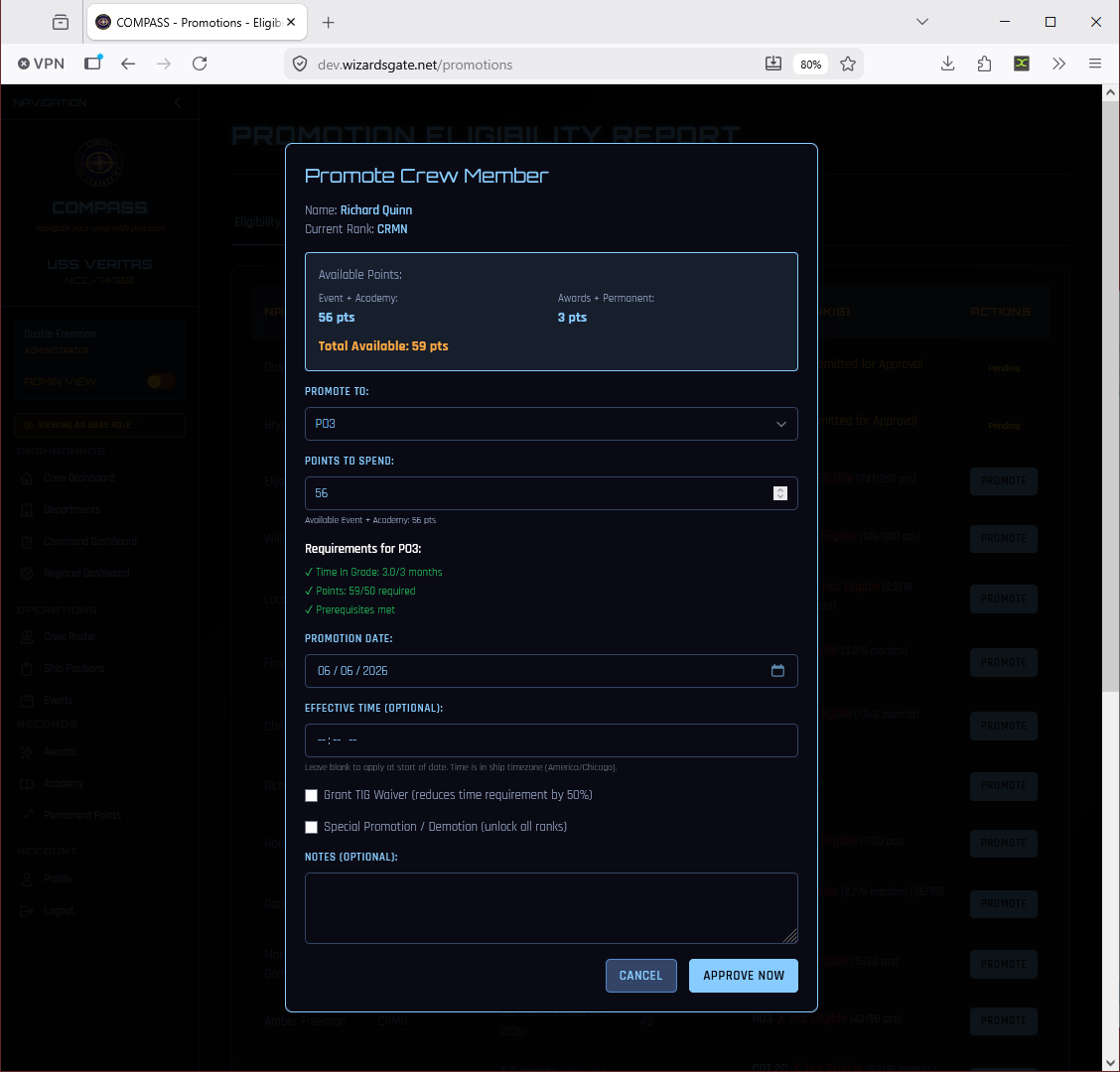
The form shows:
- Available Points — Event + Academy points and Awards + Permanent points broken out separately
- Promote To — Target rank, pre-selected as the next eligible rank
- Points to Spend — How many Event + Academy points will be consumed by this promotion
- Requirements — All requirements with green checkmarks confirming they're met
- Promotion Date — Defaults to today; can be set to any past or future date
- Effective Time — Optional; leave blank to apply at the start of the promotion date
- TIG Waiver — Reduces time-in-grade requirement by 50% for extraordinary service
- Notes — Optional internal notes visible to the RC
Step 3 — Approve
Click Approve Now. The promotion is applied immediately — no regional review required. The member's rank updates in COMPASS and they receive an email notification.
O-6 Promotions (Captain)
Promotion to Captain (O-6) requires RC approval. The form works the same as standard promotions but the submission routes to the RC rather than approving immediately.
Step 1 — Open the Promotion Form
Click Promote on the eligible crew member. The O-6 form looks similar to a standard promotion.
Step 2 — Submit for RC Approval
Click Approve Now to submit. The promotion routes to the RC's regional queue rather than approving immediately. The member is notified and the promotion appears in your Pending tab.
Flag Officer Promotions (O-7 and above)
Promotions to Fleet Captain (O-7) and above follow an extended workflow with additional narrative questions and SFI Fleet Command involvement.
Step 1 — Open the Promotion Form
The form opens the same way but shows additional O-7+ content at the bottom.
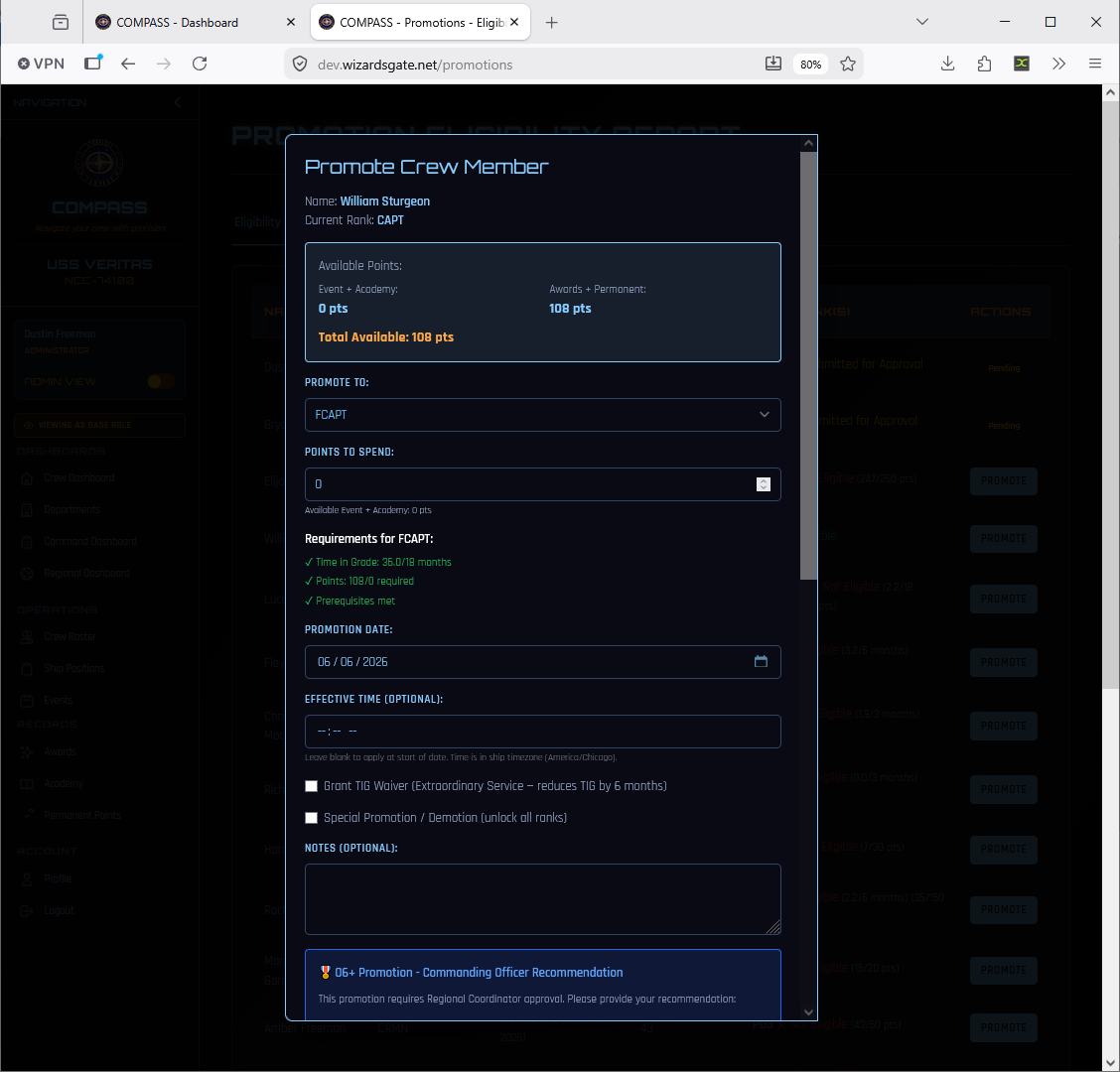
Notice the differences from a standard promotion:
- Points to Spend is 0 — permanent points drive eligibility, not event points
- The TIG Waiver description changes to "Extraordinary Service – reduces TIG by 6 months"
- An O-6+ Promotion – Commanding Officer Recommendation section appears at the bottom
Step 2 — Complete the CO Recommendation
Scroll down to the CO Recommendation section. This is required for all O-7+ promotions.
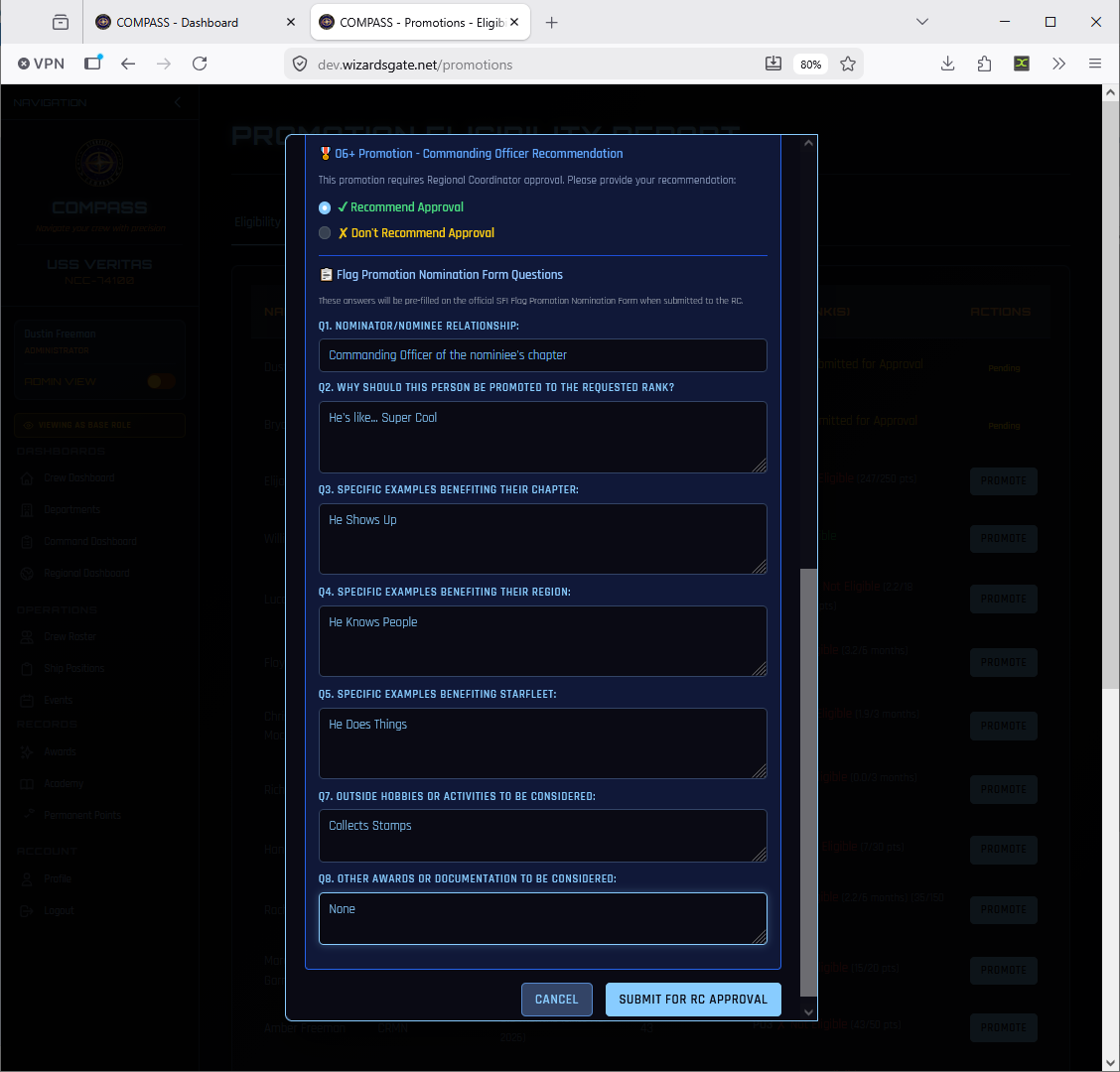
First, select your recommendation:
- ✓ Recommend Approval — You support this promotion
- ✗ Don't Recommend Approval — You do not support it (rare, but available)
Then complete the Flag Promotion Nomination Form Questions. These answers are pre-filled onto the official SFI Flag Promotion Nomination Form PDF and forwarded to the RC:
| Question | What to Include |
|---|---|
| Q1. Nominator/Nominee Relationship | Your role relative to the nominee (e.g., Commanding Officer) |
| Q2. Why should this person be promoted? | Their overall service record and qualities |
| Q3. Specific examples benefiting their Chapter | Concrete contributions to their ship |
| Q4. Specific examples benefiting their Region | Regional service, events, leadership |
| Q5. Specific examples benefiting STARFLEET | Fleet-level contributions |
| Q7. Outside hobbies or activities | Community activities relevant to their character |
| Q8. Other awards or documentation | Any additional supporting evidence |
Write Substantive Answers
Flag promotion narratives are reviewed by your RC and by SFI Fleet Command. Vague answers delay approval. Write specific, concrete examples with dates where possible. The RC can edit answers inline before forwarding, but strong original submissions move faster.
Click Submit for RC Approval when complete.
RC Review — O-6 Promotions
Once submitted, the promotion appears in the RC's Regional Promotions queue under O-6 Pending Approval.
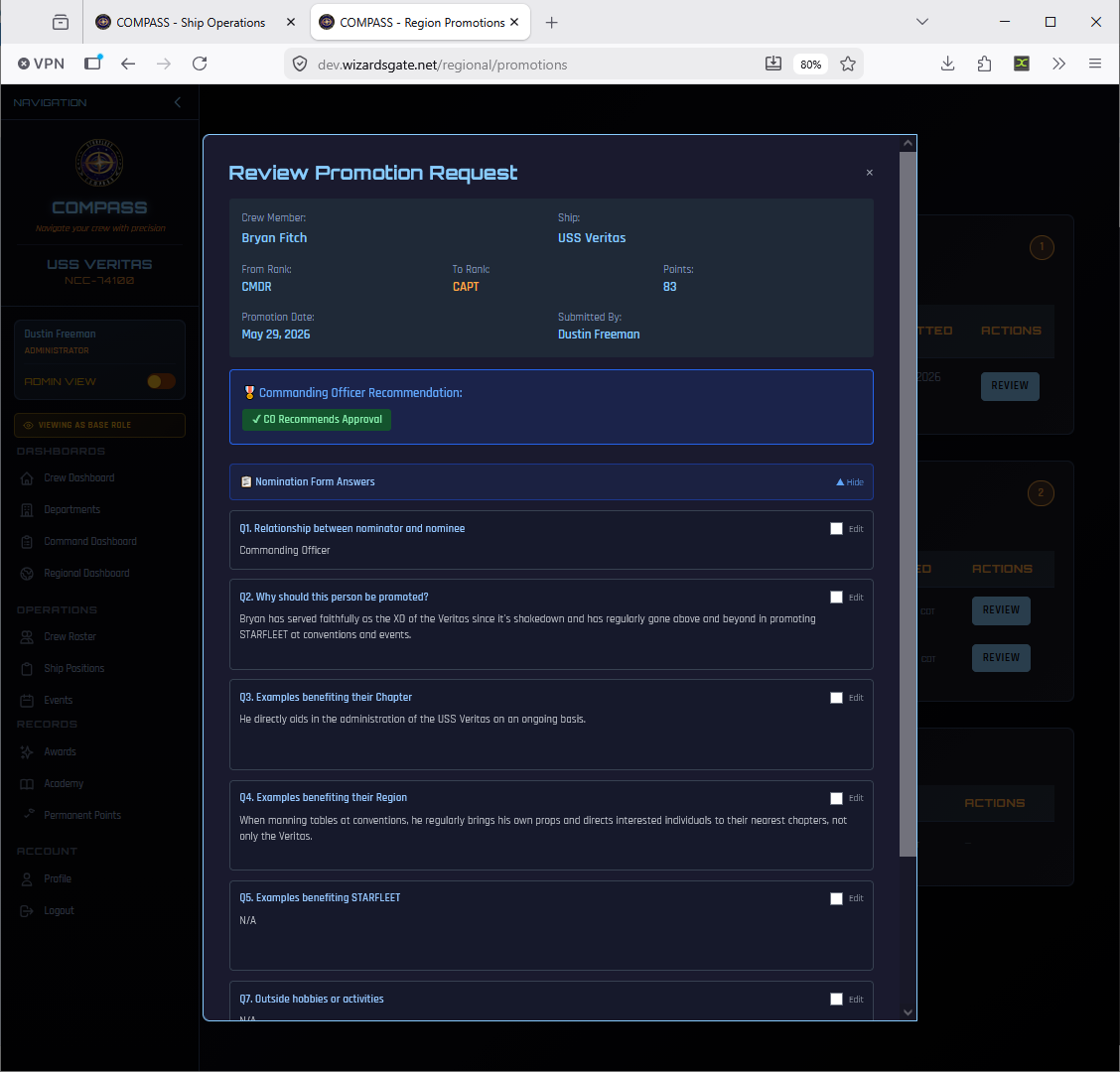
RC Reviews the Submission
The RC opens the review panel showing the full submission — member details and nomination form answers.
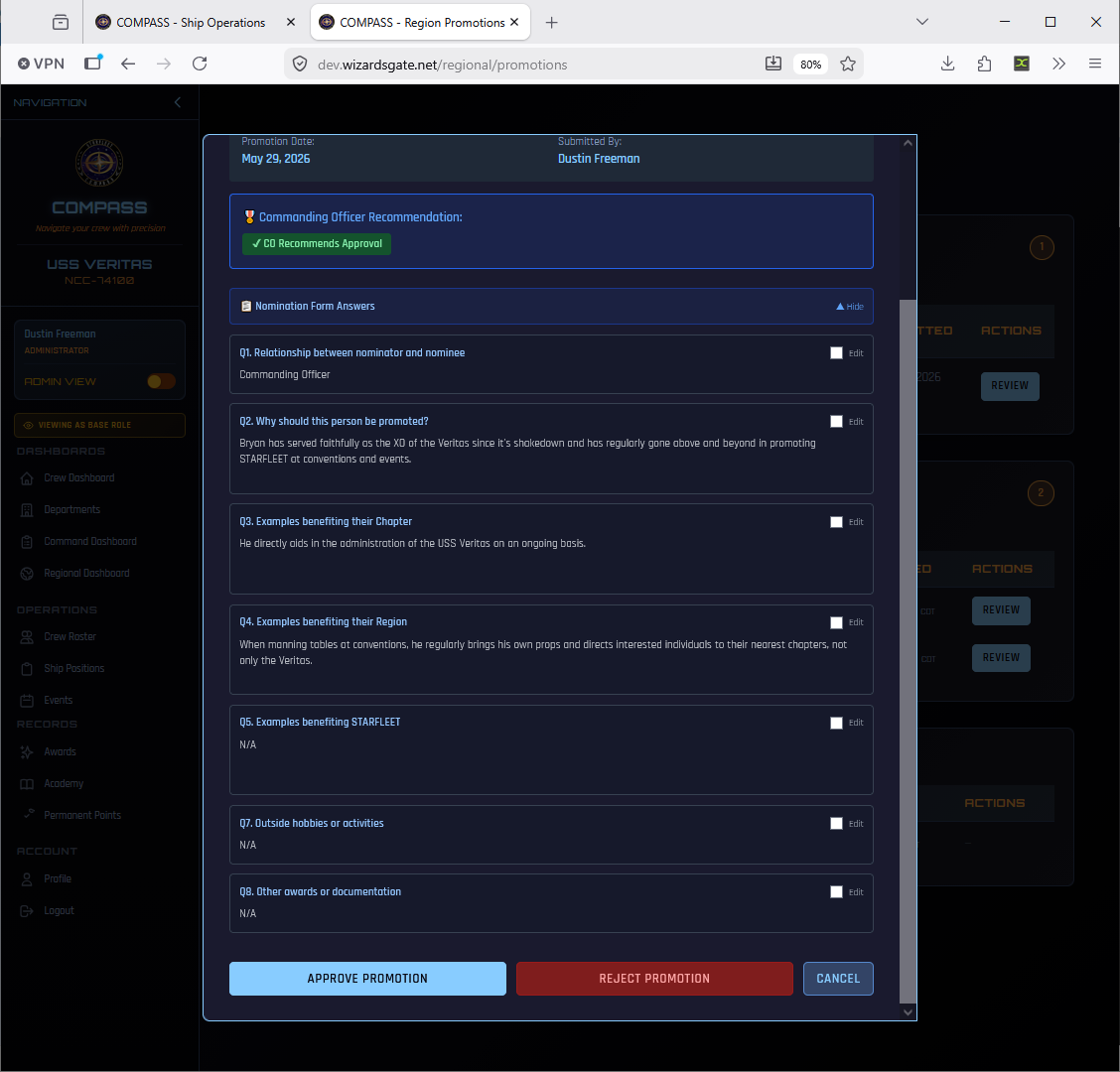
The RC has three options:
- Approve Promotion — Approves directly; rank updates in COMPASS immediately
- Reject Promotion — Rejects with a reason sent back to the CO
- Cancel — Closes without action
RC Review — O-7+ Promotions
For O-7 (Fleet Captain) and above, the RC cannot approve directly — these require SFI Fleet Command approval. The RC's role is to review, endorse, and forward the nomination.
RC Reviews and Recommends to Fleet
The RC reviews the submission the same way as O-6, but the action buttons at the bottom are different.
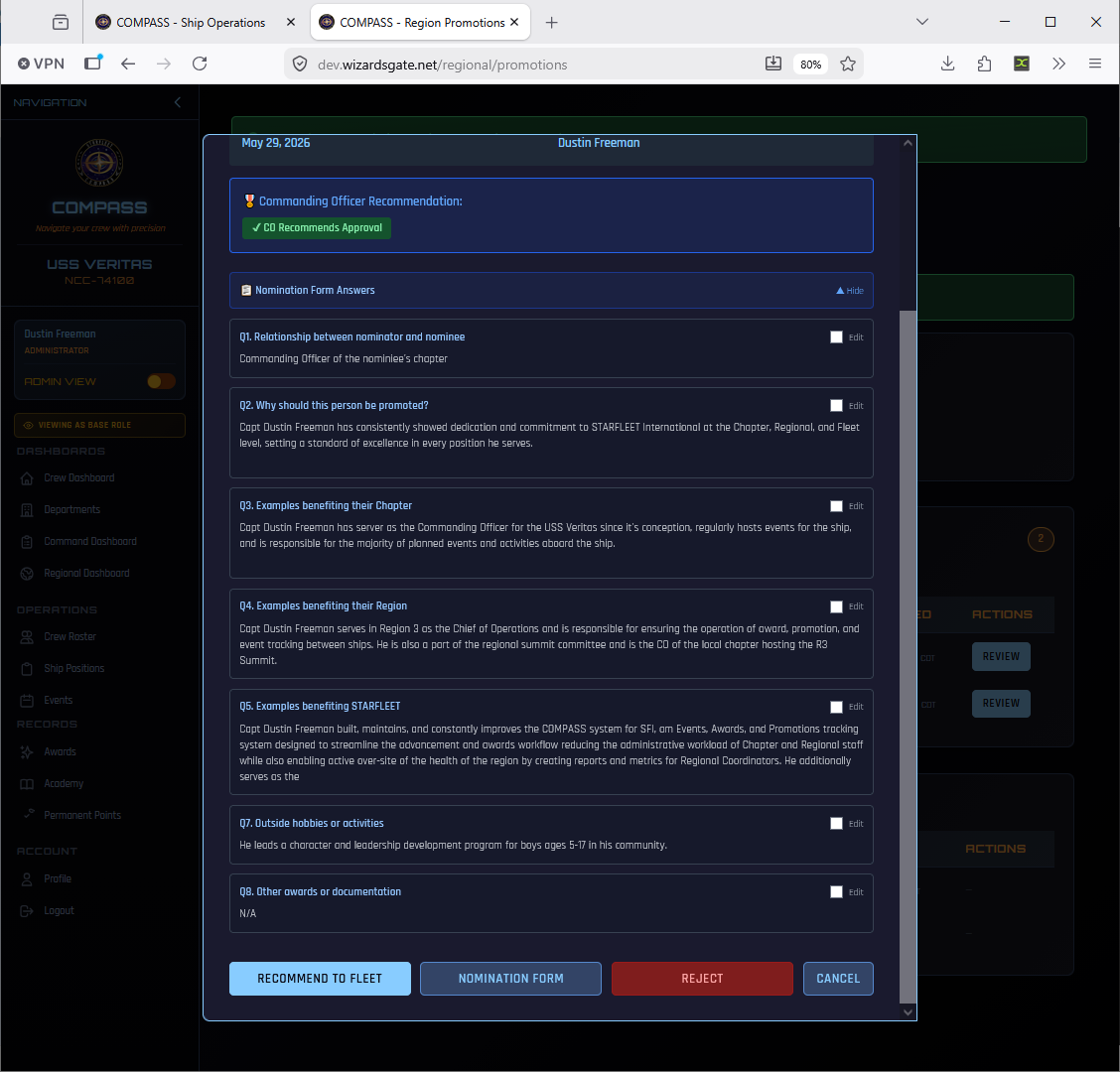
The RC has three options:
- Recommend to Fleet — Forwards the nomination to SFI Fleet Command with optional endorsement notes
- Nomination Form — Downloads the pre-filled Flag Promotion Nomination Form PDF
- Reject — Rejects the nomination at the regional level
RC Recommends to Fleet
Clicking Recommend to Fleet opens a confirmation dialog where the RC can add optional recommendation notes to Fleet Command.
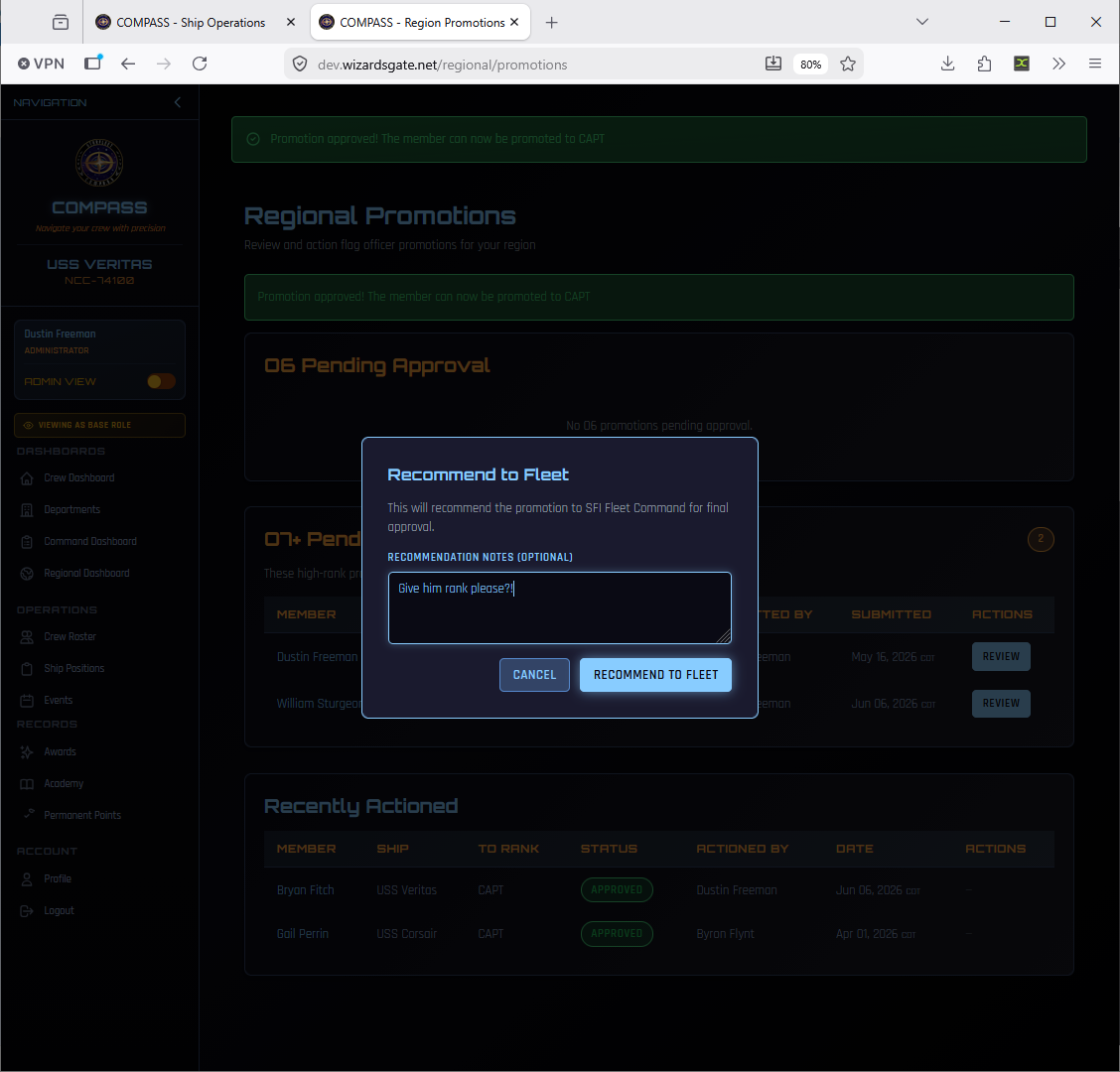
After clicking Recommend to Fleet, COMPASS returns to the Regional Promotions page with a confirmation banner. The promotion moves from the O-7+ Pending Recommendation queue into the Recently Actioned table with a status of Awaiting Fleet Decision.
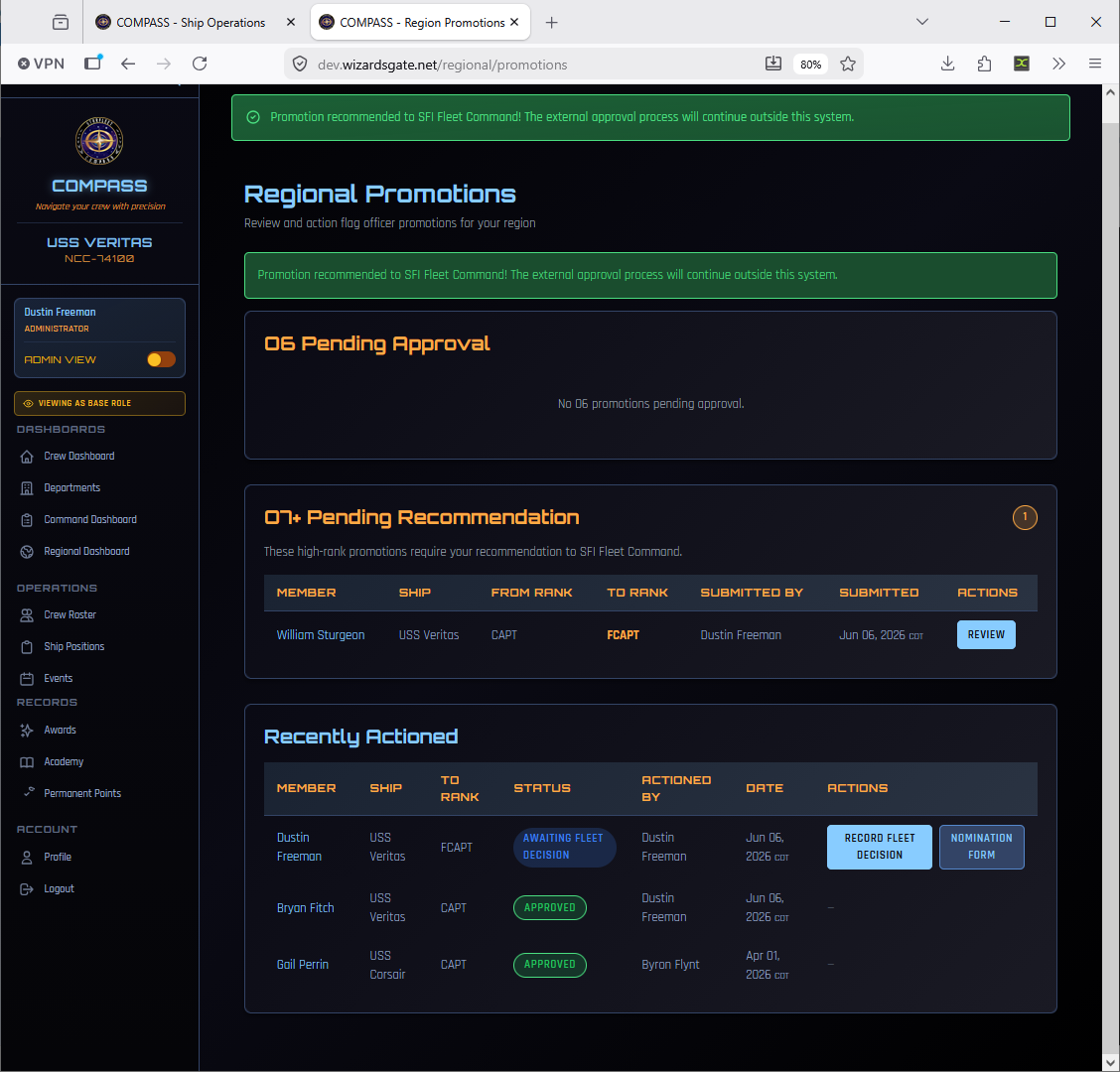
From this view the RC can see:
- The green confirmation banner confirming the nomination was sent to Fleet Command
- Any remaining O-7+ promotions still needing action in the O-7+ Pending Recommendation queue
- The Recently Actioned table showing the promotion with Awaiting Fleet Decision status
- Two action buttons: Record Fleet Decision (for when Fleet responds) and Nomination Form (to download the PDF at any time)
The external approval process now continues outside COMPASS. SFI Fleet Command will review the nomination and respond. When they do, the RC returns here to record the outcome.
The Flag Promotion Nomination Form PDF
At any point during review, the RC can download the pre-filled SFI Flag Promotion Nomination Form by clicking Nomination Form.
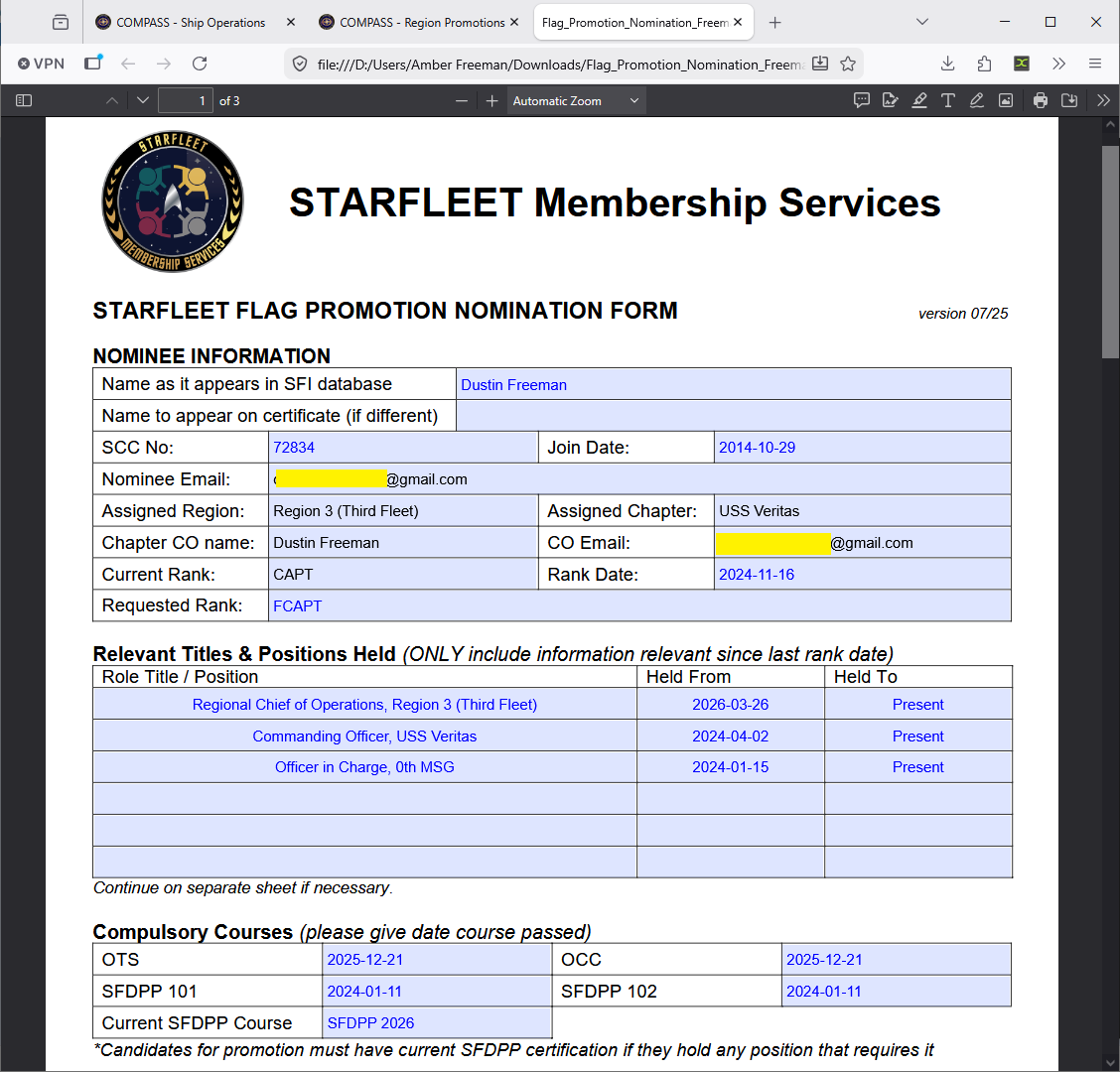
COMPASS pre-fills the entire form from data already in the system:
- Nominee name, SCC, join date, email, region, and chapter
- Chapter CO name and email
- Current rank and rank date
- Requested rank
- All relevant positions held since last rank date (pulled from ship assignments)
- OTS, OCC, and current SFDPP certification dates
This eliminates manual form-filling. The RC downloads and submits this PDF to SFI Membership Services as part of the external O-7+ approval process.
Recording the Fleet Decision
Once SFI Fleet Command responds, the RC records the outcome back in COMPASS using the Record Fleet Decision button on the promotion row.
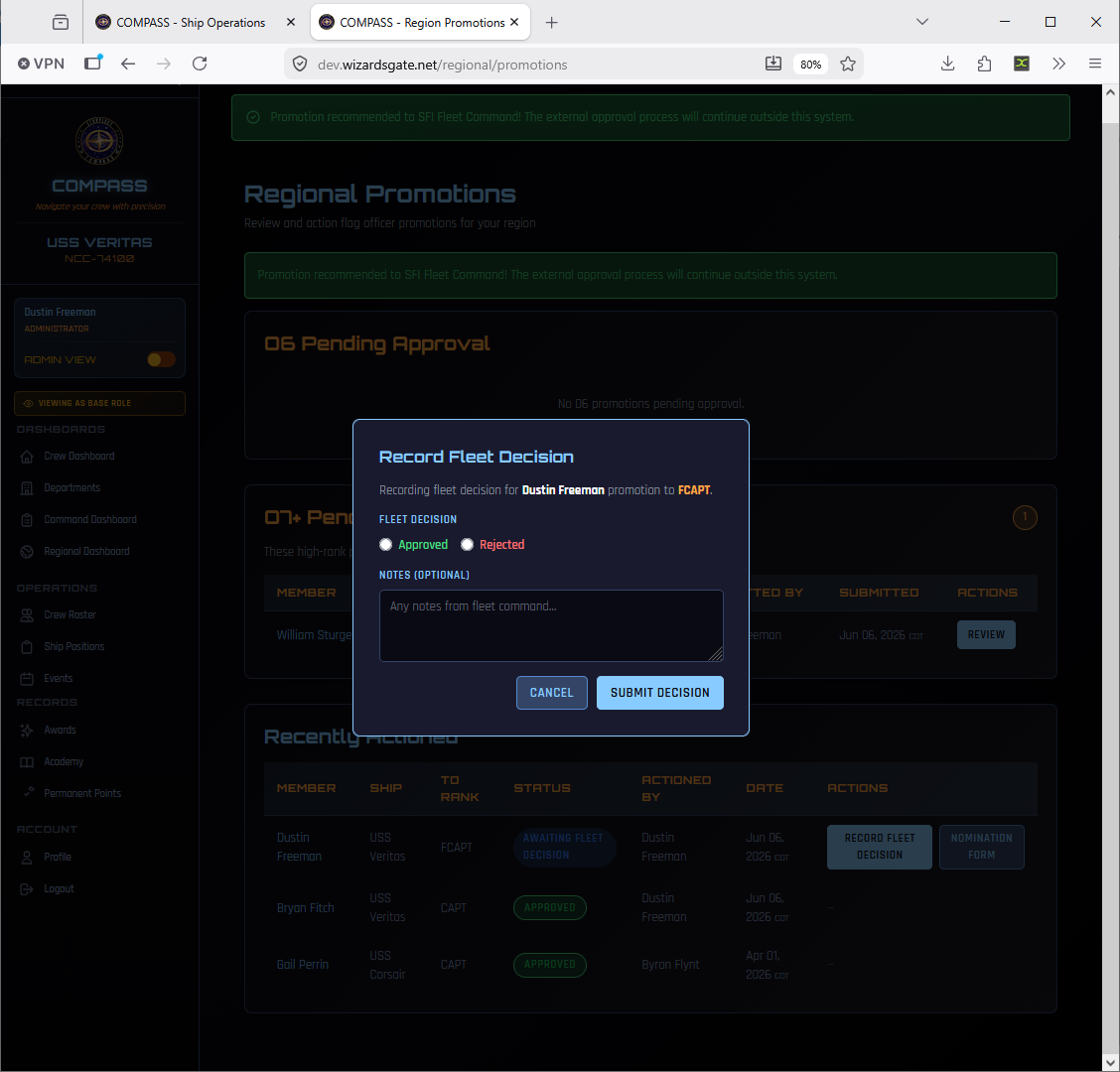
Select Approved or Rejected, add any notes from Fleet Command, and click Submit Decision. If approved, the member's rank updates in COMPASS and they are notified.
Approval Workflow Summary
| Rank | Approving Authority | COMPASS Action |
|---|---|---|
| Cadet (C-1 through C-6) | Ship CO | CO approves directly in COMPASS |
| Enlisted (E-1 through E-9) | Ship CO | CO approves directly in COMPASS |
| O-1 through O-5 | Ship CO | CO approves directly in COMPASS |
| O-6 (Captain) | RC | RC approves directly in COMPASS |
| O-7 (Fleet Captain) | SFI Fleet Command | RC recommends to Fleet; RC records decision |
| O-8 (Commodore) | SFI Fleet Command | RC recommends to Fleet; RC records decision |
| O-9 (Rear Admiral) | SFI Fleet Command | RC recommends to Fleet; RC records decision |
| O-10 (Vice Admiral) | Executive Committee | RC recommends to Fleet; EC vote required |
| O-11+ (Admiral and above) | Executive Committee | RC recommends to Fleet; EC vote required |
Common Issues
Member shows ineligible but should qualify. Check that all event attendance, academy completions, and awards are entered — missing data is the most common cause. Also confirm their OTS/OCC status is current via SFI Database Sync.
I need to correct a submission already sent to the RC. Contact your RC — they can edit narrative answers inline or return the submission for correction before approving.
The Flag Promotion PDF is missing positions held. Positions are pulled from COMPASS ship assignment records. If a position isn't showing, check that it's recorded in Ship Positions with the correct date range.
Status shows "Awaiting Fleet Decision" but Fleet has responded. The RC needs to record the fleet decision in COMPASS using the Record Fleet Decision button on that promotion row.