Awards (RC)
As RC, you are the approving authority for all award nominations submitted by ships in your region. This page covers the full regional awards review workflow.
The Awards Queue
Go to Awards in the regional navigation to see all pending award nominations from ships in your region.
Each nomination shows the nominee, award, nominator, ship, citation, and submission date. Nominations are grouped by award category.
Reviewing a Nomination
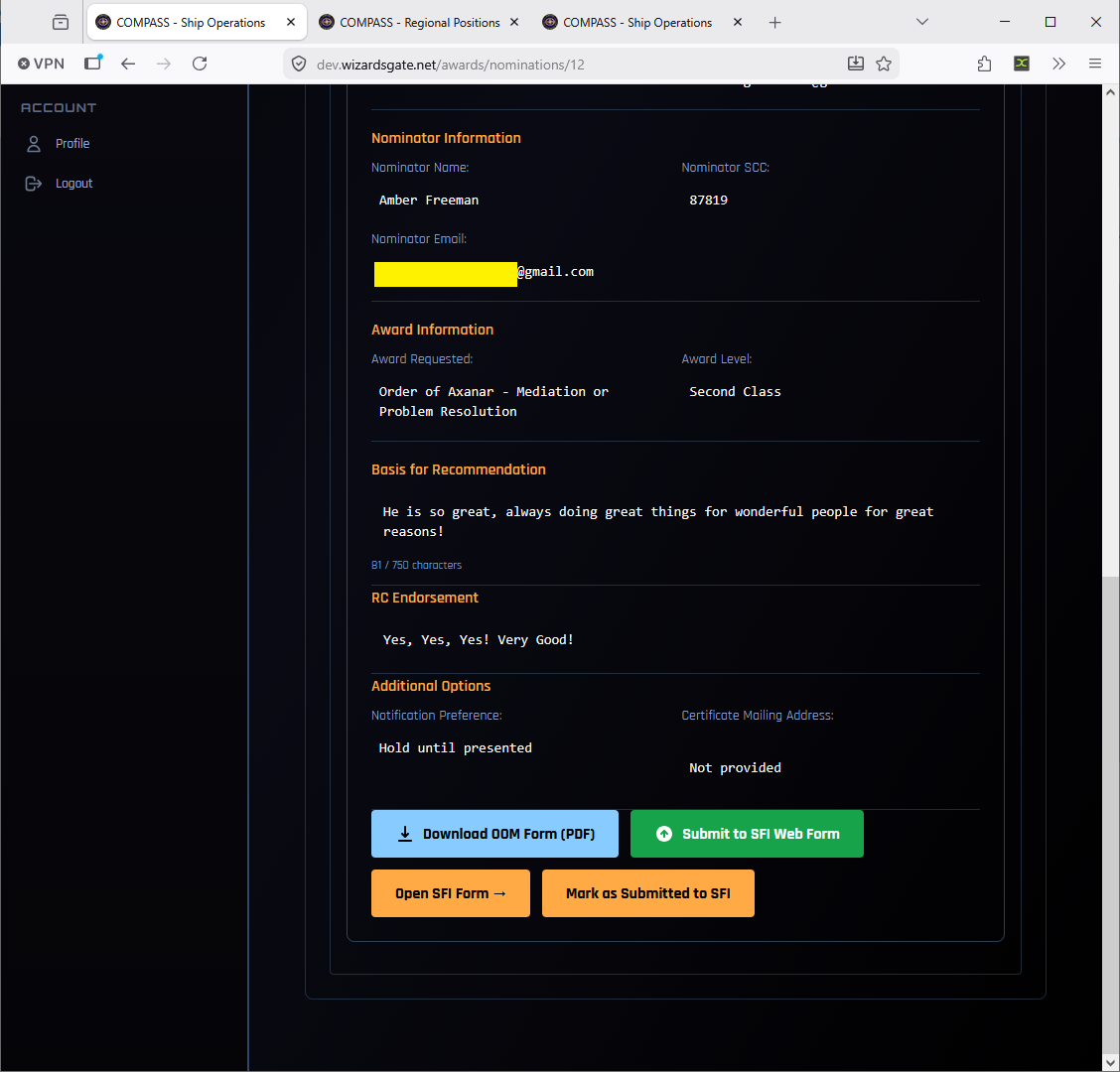
Click on any nomination to open the full review panel. The panel shows:
- Nominator Information — name, SCC, email, and their relationship to the nominee
- Award Information — the specific award requested and its class/level
- Basis for Recommendation — the nominator's citation narrative
- RC Endorsement field — your optional endorsement statement
Adding an RC Endorsement
For Order of Merit nominations, you can add an RC Endorsement — a brief statement from you supporting the nomination. This is included in the official submission to SFI and strengthens the case for approval. While optional, it's good practice to add one for any nomination you're forwarding.
Submitting to SFI
Approving an Order of Merit does not send it to SFI
Once an Order of Merit is approved, someone has to email the form to SFI. COMPASS does not do it. The chapter CO usually sends it; you, your VRC and your RAO can too, and you all see the same reminders until it's done.
Once approved, the nomination shows a three-step checklist:
| Step | What to do |
|---|---|
| 1. Download OoM Form (PDF) | Downloads the pre-filled SFI Order of Merit nomination form |
| 2. Email it to SFI | Send the PDF to SFI MemServ - Merits Director at merit@sfi.org. Open email to merit@sfi.org starts the message with the subject filled in |
| 3. Mark as Submitted to SFI | Records the submission and clears the reminder banner for everyone in the region and the chapter |
Until step 3 is done, the nomination appears in a reminder banner at the top of every page and as a red card on your dashboard. The CO guide walks through it with screenshots: Sending an Order of Merit to SFI.
When SFI replies, open the nomination and record Awarded by SFI or Rejected by SFI.
The Pre-filled Nomination Form PDF
The generated PDF is pre-filled with all nominee, nominator, region, and chapter information — eliminating most of the manual data entry on the SFI side.
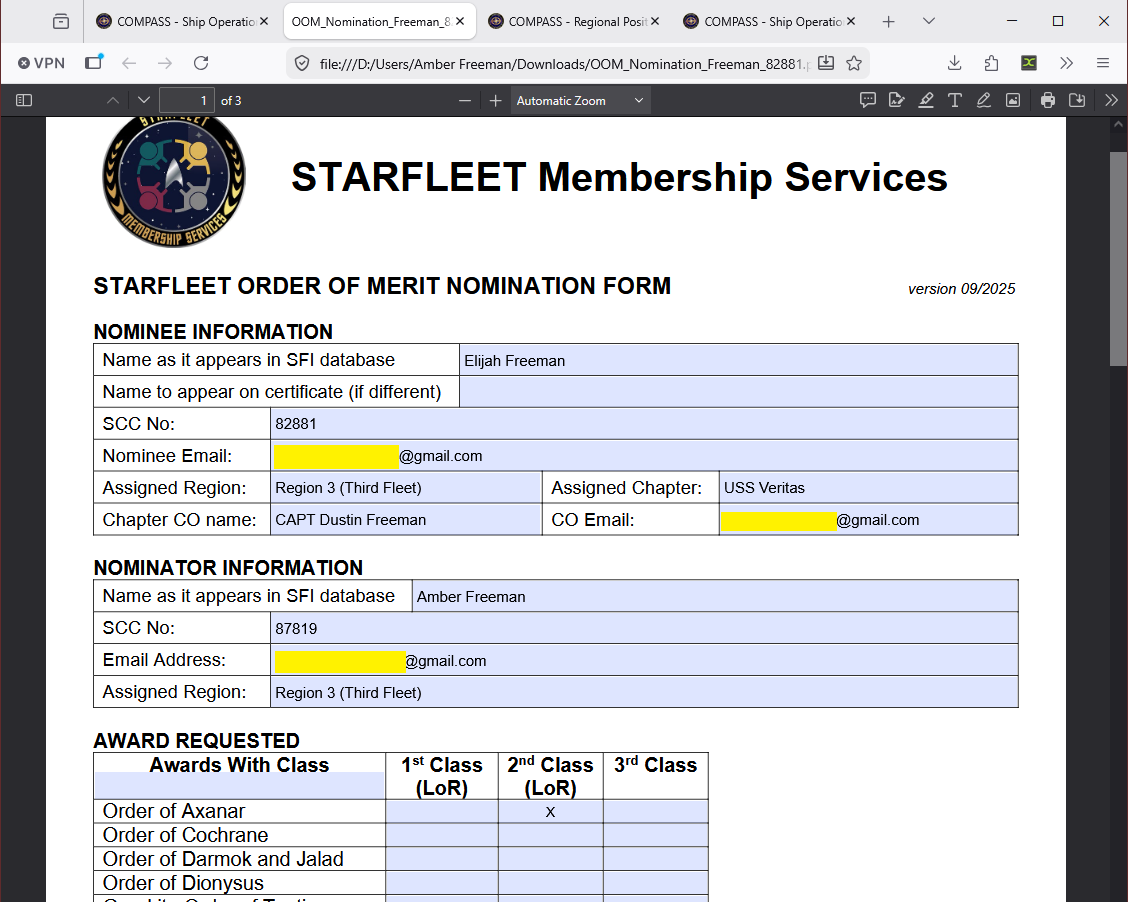
Review the PDF before submitting to confirm all details are correct. If anything needs correcting, return to the nomination and edit before downloading again.
Notification Preferences
When approving award nominations, set the Notification Preference for how and when the member is told about their award:
| Option | When to Use |
|---|---|
| Notify immediately | Member can be told right away |
| Hold until presented | You plan to present the award at a meeting, event, or convention and want to announce it in person first |
This setting is per nomination — you can hold some awards and immediately notify others based on the circumstances.
Awards Workflow Tips
- Check the Pending Actions panel on your Regional Dashboard daily — it surfaces all award nominations waiting for your review alongside promotions
- Always add an RC Endorsement for Order of Merit nominations — it strengthens the submission and signals to SFI that the nomination has regional backing
- Use Hold until presented for awards you plan to announce at the Regional Summit or ship events — it makes for a better experience for the recipient
- Encourage COs to write detailed citation narratives — vague citations slow down SFI processing and reflect poorly on the submission
- Click Mark as Submitted to SFI as soon as the form is emailed to merit@sfi.org — it clears the reminder for the CO and the rest of regional staff, and stops a second person emailing the same nomination